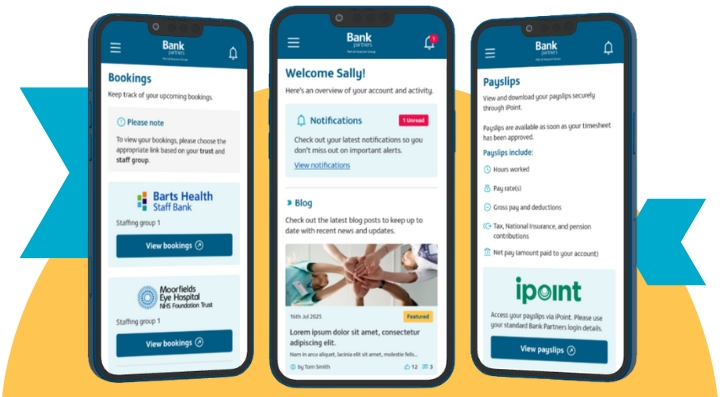
 Introducing the new Bank Partners portal, your all-in-one destination for managing your bank work.
Say goodbye to juggling multiple platforms and hello to a smarter, simpler way to manage your shifts, payslips, training, and support. The new Bank Partners portal puts everything you need in one place; accessible from any device, with no app download required.
Why you'll love it
Whether you're booking shifts, downloading payslips, or completing mandatory training, the portal makes it all effortless. You’ll also receive real-time updates straight to your phone and get fast, friendly support from the Bank Partners team whenever you need it.
Designed to work like an app on any device (phone, tablet, or desktop), the portal doesn’t take up storage space and can be added to your home screen for quick access. It’s built to simplify your working life, especially if you work across multiple staff banks.
Key features at a glance
- All your shifts in one place: View, book, amend, or cancel shifts from a single, streamlined platform.
- Instant access to payslips: Download your payslips quickly and securely.
- Complete e-learning training: Stay compliant with Espirita Learning, accessible right from the portal.
- Get help and support: Reach the Bank Partners team in just a few clicks.
- Stay informed, instantly: Receive important updates and shift notifications straight to your phone.
- No app store needed: Access the portal directly—no downloads, no storage space required.
- Always up to date: As a progressive web app (PWA), the portal updates automatically.
- Smarter navigation: Enjoy a clean, intuitive layout that helps you find what you need faster.
- Helpful resources: Access guidance and wellbeing support tailored to your bank work.
- Multi-bank made easy: Manage work across multiple staff banks in one place, with trust-level filtering.
Add the portal to your home screen
You can add the portal to your home screen for quick access, just like an app.
For Android users:
- After logging in, tap the banner that says “Add to home screen.”
- If the banner doesn’t appear, tap the three dots menu (⋮) and select “Install app.”
For iPhone users:
- After logging in, tap the share icon (square with an arrow).
- Scroll down and tap “Add to Home Screen,” then tap “Add.”
Enable notifications
To stay updated, make sure to allow notifications when prompted. If you miss the prompt, you can enable them manually in your phone settings.
Need to reset your password?
You can reset your password directly from the portal, no need to contact us. If you don’t receive the reset email, check your spam or junk folder just in case.
Link expired?
If your 'create account' link has expired, simply visit the portal and select ‘Reset password’ on the login page. You’ll receive an email with a link to reset your password. Please check your junk folder if it doesn’t arrive.
Ready to simplify your bank life?
We’re rolling out the new portal across all staff banks in September and October 2025. Keep an eye on your emails as we’ll be sharing everything you need to get started, including how to access the portal soon.